by Anna Gondzik
I’ve built on both Shopify and WooCommerce over the years, and honestly, I don’t think they’re direct competitors.
It’s kind of like comparing WordPress and Webflow — they overlap a bit, but they really exist for different kinds of businesses, and you can usually tell which camp you belong to once you understand their capabilities and limitations.
WooCommerce vs. Shopify in a Nutshell
Shopify is the plug-and-play store builder. If you just want to launch quickly, sell products, and not deal with tech or real SEO, Shopify is your best friend — hosted, secure, and ready to go right out of the box.
WooCommerce is the customizable powerhouse. It takes more setup, but once tuned properly, it’s infinitely flexible. You own it, control it, and it’s built to power your content marketing, SEO, and growth over time.
A quick reality check before we dive in
I build in WordPress primarily, so yes, I know it best and have a natural bias. But this isn’t a sales pitch. Shopify absolutely has its place (and I’ll show you where it wins). The goal here is clarity: which one actually fits your business, not which one’s cheaper, trendier, or gets better affiliate payouts.
If you’ve read the usual “Shopify vs WooCommerce” comparisons online, take them with a grain of salt. Most are written by marketers or casual users, not developers, and they make a few limiting assumptions.
They often assume you’ll use shared hosting, a prefab template, or that WordPress is “free” (it is, technically — but a free, unmaintained site is just digital junk).
They also tend to obsess over costs, as if that’s the whole story. In reality, maintenance varies wildly depending on setup, hosting, and developer quality. And cost should never be the main deciding factor anyway. Who cares if Shopify costs '$1/month' if you never sell anything?
Here's the thing: most comparisons are framed in the “low budget, get an eShop quick, and pick the prettiest template” point of view. If that’s your goal, Shopify is hands down your best bet. Try Shopify free for 3 days.
However, when it comes to a degree of custom design, building a truly custom Shopify theme can easily cost as much as (or more than) a custom WordPress build. Shopify’s drag-and-drop tools are fine for simple stores, but once you need pixel-perfection, an optimized UX, or deeper integrations, you’re right back in developer territory - just with more limits.
So if you’re going to invest real money into design and development, why do it inside a box? A properly built WooCommerce site can match Shopify’s polish and surpass it in flexibility, performance, and lifespan.
This comparison is about fit, and which platform actually helps your business perform, convert, and grow. WordPress tends to win when customization and scalability matter most, but again - obviously, go with Shopify if you need a quick, slick, ready-made template solution.
WooCommerce takes work, but pays off big.
Full transparency: WooCommerce sucks straight out of the box. It’s barebones. Ugly, even. The default UX is just ... very 'developer-y'. And yes, if you Frankenstein it together with cheap plugins or skip proper dev work, it’ll break in very creative ways.
But here’s the secret: the problem isn’t WooCommerce — it’s the implementation.
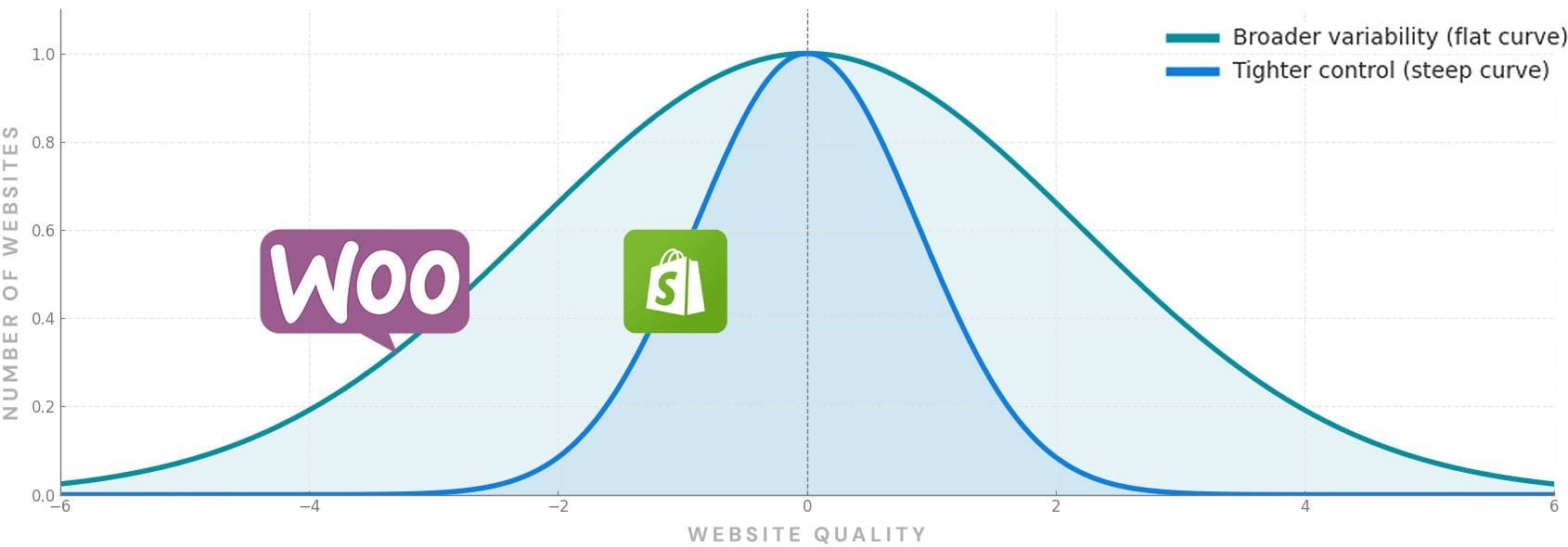
Conceptual illustration only — proportions are not to scale. Shopify sites tend to cluster around average performance, while WooCommerce spans a broader range — from poorly built outliers to top-tier, high-performing enterprises.
With solid development, thoughtful customization, and the right infrastructure, WooCommerce can run circles around Shopify.
The problem is, most people don’t do this.
They grab a pre-built theme (if you are even thinking about doing this, just go with Shopify), toss in a few plugins, and call it a day. The result is a clunky site that’s slow, insecure, and impossible to maintain. That’s not WooCommerce’s fault; that’s like blaming your car for stalling after filling the tank with soda.
To get WooCommerce to work beautifully, you definitely need:
If you don't plan on doing any sort of content marketing or meaningful SEO, just go with Shopify.
Why Shopify Still Owns the Big Leagues (that doesn't mean it's right for you)
If WooCommerce can scale infinitely and be tuned to perfection, why do so many big, high-traffic stores run on Shopify? It’s not because Shopify is inherently “better.” It’s because at a certain level of success, risk management and accountability start to matter more than technical purity.
Shopify wins the top-traffic share not through flexibility, but through risk offloading. Enterprise-level brands aren’t paying for code freedom; they’re paying to sleep at night. Shopify Plus hands them PCI compliance, DDoS protection, guaranteed uptime SLAs, global CDN coverage, and a checkout that converts absurdly well out of the box. The platform’s engineering team shoulders the infrastructure burden, which means marketing and operations teams can focus on revenue, not servers.
Put simply: Shopify sells certainty.
That certainty comes with limits, of course — rigid checkout templates, paid app dependencies, and creative guardrails that frustrate developers. But for corporate teams who answer to investors and deadlines, the trade-off is often worth it. When you’re processing millions in sales, an hour of downtime or a PCI audit failure can cost more than a year of Shopify fees.
But that same certainty is what caps growth for most ambitious mid-size and emerging brands. If your website is your marketing engine, not just your storefront, those guardrails quickly become constraints. You can’t fully control your funnel, run advanced content campaigns, or experiment freely with design and conversion flow. Every change runs through Shopify’s rules, paid apps, or API ceilings.
WooCommerce flips that equation. It takes more setup and discipline, but it gives you a growth platform instead of a sales box. You own the performance, the SEO, the UX, and the data — and you can build a site that grows sharper and smarter over time instead of just busier.
That’s why so many strong, lesser-known brands quietly migrate to WooCommerce once they outgrow Shopify. They don’t need enterprise-level compliance — they need control, adaptability, and a site that actually drives marketing ROI. WooCommerce gives them the levers to scale like a top brand, without being trapped inside one.
Then of course, once you blow up and actually become a top brand, you switch to Shopify again because your priorities become compliance and 'staying alive.'
Cases Where WooCommerce Will Outperform Shopify
When you build it right, WooCommerce gives you full control. You own the site, the data, the hosting, and the experience. Here’s where it really shines:
Advanced Product Filtering and Search
Shopify has come a long way since the days of “one-size-fits-all” collections. The modern Online Store 2.0 setup lets you add basic filters like price, product type, vendor, and custom tags. That’s fine for small stores, but the structure is rigid.
If you want faceted filters (like color + size + brand working together dynamically) or instant AJAX search results that update without reloading the page, you’ll quickly hit a wall. You can install third-party apps, but they run through Shopify’s APIs, which means limited access to your product data and slower load times. They also rarely feel fully integrated with the theme.
WooCommerce, on the other hand, is basically a blank canvas. You can build advanced, faceted navigation that filters by custom attributes, categories, price ranges, user behavior, anything. You can integrate real-time search that feels instantaneous, and tailor it to how your customers browse. It just takes proper development to get it right.
SEO and Content Marketing
Shopify can absolutely do basic SEO: you can edit meta titles, descriptions, and alt tags, and apps can extend that to structured data, redirects, and canonical URLs. But it can’t compete with WordPress in flexibility. You can’t edit robots.txt freely, customize canonical tags on a per-template basis, or easily control how dynamic URLs (like filtered collections) appear to Google. Blog tagging and content hierarchy are rigid, which limits advanced topic clustering and internal link sculpting — two of the biggest levers for organic growth.
WordPress (and by extension, WooCommerce) is built for discoverability. You get full control over everything: URL structures, schema types, internal linking logic, dynamic meta fields, rich snippets — you can even create SEO-driven landing page templates that generate automatically from product data. And because your blog, landing pages, and store all live under one CMS, you can tie content marketing directly to product visibility.
That’s why WooCommerce still dominates when SEO and long-term content strategy are part of the growth plan. Shopify is great for quick wins; WooCommerce is great for compounding ones.
Checkout Customization
Shopify’s checkout is sleek and secure, but it’s also locked down. Unless you’re on Shopify Plus ($2k/month+), you can’t customize much beyond colors, fonts, and logo placement. You can’t rearrange fields, split steps, or add logic (like conditional shipping methods or upsell modals). It’s designed to be simple and uniform — which is fine, unless you actually want to test and optimize.
For contrast, $2k/month+ on WooCommerce, should have users wiping back tears as they complete the smoothest checkout of their lives.
WooCommerce gives you complete freedom. You can build Shopify-style single-page checkouts or go further and add cross-sells, reorder fields, auto-fill returning customer info, connect CRM triggers, integrate custom payment gateways, or create multi-step checkouts designed for conversion. The default checkout experience is mediocre, but once customized, it can outperform anything Shopify allows.
Performance Tuning
Shopify handles performance for you — CDN, caching, image optimization, and global servers are all part of the package. The trade-off is you can’t control any of it. You can’t choose your CDN provider, change caching rules, or tweak code execution. If a page feels sluggish due to third-party apps, you’re stuck with it until you remove them.
With WooCommerce, you control the hosting environment, caching layers, database optimization, and even front-end delivery. You can tailor performance to your traffic pattern and use tools like LiteSpeed or Cloudflare to push load times below 1 second. The catch: it takes solid configuration work. But when done right, WooCommerce can outperform Shopify by a mile — especially on large, complex stores.
Total Cost of Ownership (TCO)
Shopify feels cheaper upfront because hosting, security, and updates are bundled in. But add transaction fees, paid apps, and design limitations, and it often ends up costing the same or more than a well-built WooCommerce site.
WooCommerce, on the other hand, shifts more cost into maintenance and management — plugin updates, hosting, backups, and occasional dev hours. But those expenses go toward improving and owning your infrastructure, not renting access to it. Over time, that difference compounds in your favor.
WooCommerce maintenance can add up, but it builds equity instead of feeding a closed ecosystem.
Just remember: no platform (Shopify or WooCommerce) is truly “set and forget.” Every site has a life cycle — design, tech stack, and user expectations all evolve. The goal is to extend that cycle and modernize on your own terms, not rebuild from scratch every time something breaks.
Integrations and Ownership
Shopify integrates with thousands of apps, but they exist in Shopify’s ecosystem. Most are paid, API-limited, and subject to Shopify’s approval and rules. Each app adds to your monthly cost, often billed per feature set. It’s not unusual for a mature Shopify store to pay hundreds per month in app fees — for functionality that’s native or one-time cost in WooCommerce. You don’t own the data or the checkout flow; you’re essentially renting space in their ecosystem. If Shopify changes policies (and they do), you adapt or lose functionality.
WooCommerce is open source and lives on your server. You own the site, the data, the customer records — everything. You can integrate with any external system (CRM, ERP, email automation, analytics) however you want, without API throttling or app-store fees. It’s more responsibility, but it also means freedom. Your business can evolve without asking permission.
Shopify's Transaction Fees (The Hidden Tax)
One thing most people overlook: Shopify takes a cut of every transaction processed through your store — unless you use Shopify Payments (their own gateway) or code your own custom processor. This is essentially a platform tax on your revenue.
When you don’t use Shopify Payments (Shopify’s native payment gateway), Shopify charges a third-party transaction fee on top of whatever your external gateway charges. The rate varies by plan — for Basic it’s about 2% of the order, for the Shopify plan around 1%, and for Advanced as low as 0.5%.
With WooCommerce, you choose your gateway (Stripe, Square, Authorize.net, etc.) and pay only standard processing fees. There’s no middleman markup. Over time, especially for high-volume stores, Shopify’s cuts add up like property taxes — they never go away.
When Shopify Is the Smarter Choice
If you’re a new business that just wants to sell some products and not deal with tech, Shopify’s great. You’ll have a store up fast, security and hosting handled, and an interface anyone can learn in a weekend.
For product-based businesses that don’t need deep marketing or technical customization, it’s perfect.
Go with Shopify if:
When WooCommerce Is the Smarter Choice
If your website is more than just a store; if it’s part of your brand ecosystem, your content strategy, your SEO, your lead generation - WooCommerce wins.
You can build it to look and function exactly how you want. You can scale it endlessly. You can make it smarter over time instead of boxed in.
Just remember: the same freedom that makes WooCommerce powerful also makes it easy to screw up. Hire cheap, and you’ll pay for it later - usually in bugs, speed issues, and conversion drop-offs.
Go with WooCommerce if:
Final Take
Shopify makes sense for simplicity. WooCommerce makes sense for growth.
One is plug-and-play; the other is build-and-own.
The real question isn’t “Which one is better?” — it’s “How far do you plan to go?”